


Cync (the new name of C by GE)
4.412.24K Reviews
App Specs
- Version
- 6.23.2.74-c2df446
- Updated On
- License
- Free
- Downloads
- 1,000,000+
- Developer
- Savant Systems, Inc.
- Categories
- Lifestyle
- Platform
- Android
Screenshots

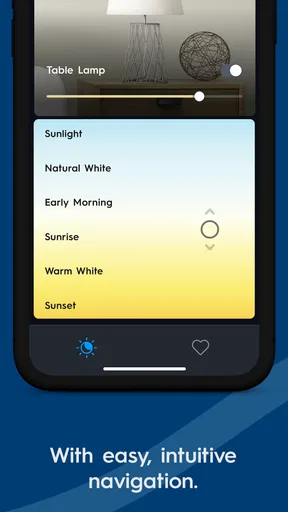
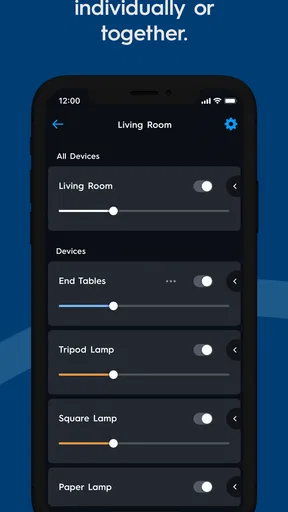
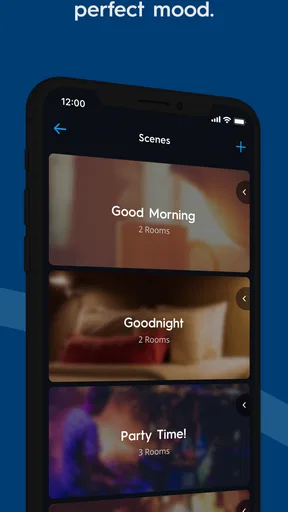
 Analysis by AppCompare
I spent time with Cync as a connected-home control app, and my main impression is that its usefulness depends less on the app itself than on how well your phone, home network, and Cync or C by GE devices cooperate. That is not a criticism unique to this product, but it matters here because the app is designed to bring several everyday controls into one mobile experience. When the connection behaves, switching lights or adjusting a room feels pleasantly direct. When the network is slow or a device is not responding, the same simplicity can turn into uncertainty.
Developed by Savant Systems, Inc., Cync belongs to the lifestyle category and is available free of charge for everyone. It has been around since March 9, 2016, and the current release is version 6.23.2.74-c2df446, with support beginning at Android 8.1. Those details make it accessible to a broad range of phones, although a compatible operating system alone does not guarantee a smooth smart-home setup. Your existing equipment and the quality of your connection still shape the experience.
How Cync feels when the network is doing the work
The clearest way to understand this app is to use it during an ordinary routine rather than treating it like a digital catalog. Imagine arriving home with shopping bags, opening Cync, and trying to change the lighting before putting everything down. The appeal is obvious: one place on the phone can become the practical bridge between you and your connected devices. You do not need to walk through the house to make a small adjustment, and you can make that adjustment from a different room when the situation calls for it.
That convenience is also where connectivity becomes visible. A tap is not the same as an immediate physical result if the request has to travel through your phone and network before the device reacts. A brief delay may be harmless when you are changing a lamp, but it becomes more irritating when you are repeatedly tapping because you are unsure whether the first command worked. My best advice is to pause after a command instead of treating every delayed response as a failed one. Repeated taps can make a simple action harder to read.
For people who already use Cync or C by GE products, the app has a sensible role as a central control point. It is more useful than relying on separate controls scattered across a room, especially when you want to manage several devices from a phone. The benefit is not that it replaces every other smart-home option; it is that it gives this particular device family a common place to start and adjust the experience.
The app’s public reception suggests that this basic idea works for many people. It holds a 4.4 average from around 91 thousand ratings, and it has passed one million installs. I would read those figures as evidence of a substantial user base, not as a promise that every home will behave identically. Smart-home reliability is unusually sensitive to the combination of hardware, network conditions, phone settings, and distance from the equipment.
Why a small delay matters more than it seems
Connected controls are judged by expectation. If I press a button in a conventional switch, I expect a physical response almost immediately. With Cync, I have to allow for communication between several points. That makes the app feel excellent when the result is quick and slightly awkward when the response is ambiguous. The difference is only a moment, but it changes whether the app feels like a natural control or an extra layer between me and the room.
Worth Reading Before You Choose

EA SPORTS FC Mobile 26 Is a Bigger Football Game, but It Takes Time

Flipboard Shows What News Apps Must Do Beyond the Feed

Switching to Android Auto Means Rethinking Your Driving Routine

Google Calendar Makes a Crowded Week Easier to Manage

Ludo King Makes the Most of the Minutes Between Plans

Baby Panda World Brings Quick Play to Modern Phones, but Its Game Library Feels Busy
This is why I prefer using it for deliberate adjustments rather than frantic ones. Setting the atmosphere before watching a film, changing a room while seated, or checking a device from another part of the home gives the app time to show what happened. If you need instant, fail-proof physical control every time, a traditional switch remains the more dependable choice. Cync adds flexibility, but it does not remove the realities of a connected system.
Using it away from the wall switch
The strongest mobile use case is not necessarily controlling a device from the sofa. It is the freedom to make a change without being in the same place as the device. I found that especially useful when moving between rooms, preparing a space for someone else, or making a small adjustment while my hands were occupied with another task. The phone becomes a portable control surface, which is more convenient than searching for a particular physical control.
There is a trade-off, though. A phone is a personal device, while a wall switch is immediately available to everyone in the room. If several people share a home, the app works best as an additional option rather than the only way to operate connected lighting. Someone who does not want to use a phone should not be forced into a mobile workflow for a basic household action. In my view, Cync makes the most sense when it complements normal room controls instead of trying to replace the habits of every person in the household.
It is also worth thinking about where you use the app. A strong home connection can make the experience feel straightforward, while a weak signal or congested network can make a command appear less certain. I would avoid testing the system for the first time during an important moment, such as leaving the house in a hurry. Set up your usual routines when you have time to observe how quickly the app and devices respond, then decide which tasks you trust to the phone.
For a person who travels frequently, the attraction is the idea of managing a connected home without being physically beside it. However, I would not build an important safety assumption around a command unless I had already tested the exact setup repeatedly. A lighting adjustment is one thing; relying on an app as the sole confirmation that everything at home is in the desired state is a much higher standard. Cync can be convenient at a distance, but convenience should not be confused with guaranteed awareness.
A practical routine for shared homes
One useful approach is to give each type of control a clear purpose. Use the app for changes that benefit from mobility or grouping, and keep familiar physical controls available for quick everyday actions. This reduces the frustration of someone reaching for a switch while another person is trying to do the same thing from the phone. It also helps new users understand that the app is an option, not a test they must pass before they can use the room.
I would also name your own mental routines clearly, even if the app’s exact organization depends on the devices you have. Think in terms of actions such as “settle the living room” or “prepare the bedroom,” rather than opening the app without knowing what you want to change. A clear intention makes a connected control app feel faster because you are not exploring while the network is also trying to respond.
What happens when a command fails
The most important part of reviewing a connected app is not the successful tap. It is the moment when nothing happens. Cync’s biggest limitation is shared by this entire category: a failure can occur at more than one point, and the app may not immediately make the cause obvious to an ordinary user. The phone may be online while the home network is struggling, the network may be fine while a device is unavailable, or the device may respond slowly enough to create doubt.
My recovery habit is simple. First, I check whether the app has visibly changed state. Then I wait briefly rather than sending the same command several times. If the result still looks wrong, I move closer to the device or try again when the phone has a stronger connection. Finally, I use the physical control if the action is urgent. This sequence prevents a minor delay from becoming a chain of contradictory commands.
That workflow is a genuine strength of a mature user, not a special feature I would claim the app provides. The app is most comfortable when you understand that a command is a request traveling through a system, not an instant mechanical switch. Once I adopted that mindset, I found the occasional pause less surprising. New users may need a little time to develop the same patience.
Recovery also affects whether I would recommend Cync to someone who dislikes troubleshooting. If you want an app that never makes you think about network conditions, this is not the right category to enter casually. Cync may be perfectly adequate for a person willing to check a connection and keep a physical fallback. It is less appealing for someone who sees any delayed response as unacceptable or who wants a completely invisible technical layer.
When another option is better
Compared with a basic manufacturer-independent smart-home platform, Cync has the advantage of being focused on Cync and C by GE equipment. That focus can be helpful if your home is already built around those products. A broader platform may be a better fit if you own devices from many brands and want one app to coordinate everything. In that situation, Cync could become one more control app rather than the single place you hoped to use.
Compared with a traditional switch, Cync offers mobility and the possibility of handling connected devices from a phone, but the switch wins for immediacy and simplicity. Compared with a voice-controlled setup, the app gives you a visual control method and does not require speaking aloud, while voice control may be faster when your hands are full. The right choice depends on whether you value visible confirmation, physical certainty, or hands-free interaction most.
I would skip Cync if I did not own compatible Cync or C by GE products, if my main goal was to unify a large mixed-brand installation, or if I wanted household controls that remain entirely independent of a phone and network. I would also hesitate if every member of the household expects a physical control and nobody wants to learn a mobile workflow. The free price makes trying it less risky, but it does not make an incompatible setup useful.
Keeping mobile use sensible and data-conscious
A connected-home app deserves a little more thought than simply installing it and tapping through every screen. I prefer to use it with a clear purpose: control the devices that benefit from mobile access, avoid opening it repeatedly just to check whether something changed, and pay attention to what the app is asking me to do during setup. This reduces unnecessary interaction and makes it easier to notice when a behavior is unexpected.
I would not treat the app as a substitute for understanding the physical arrangement of the home. If a room has several similar lights or devices, identify which one you are changing before making a quick command. A visual name that makes sense to you is more valuable than a vague label, because it reduces accidental changes and cuts down on repeated checking. This is one of those small organizational choices that improves the experience more than simply updating the phone.
For people who monitor mobile data closely, the sensible approach is to use the app mainly where the phone has a reliable connection and to avoid assuming that every interaction will behave the same way on a weak mobile signal. I would also keep the app and phone’s operating system in a condition they can reasonably support. The minimum listed operating system is Android 8.1, so owners of older phones should pay attention to compatibility before planning a setup around it.
Privacy and data-conscious use are not reasons to reject the app automatically, but they are reasons to read setup screens carefully and choose only the access and account behavior that makes sense for your home. I avoid granting broad access without understanding why it is needed, and I do not install a connected-home app on a phone that is already struggling with storage, battery, or network reliability. Those practical details often determine whether the app feels dependable.
Small habits that improve the experience
- Wait for one command to settle before sending another, especially when the device has not visibly responded.
- Keep a physical way to control important lights so a phone or network problem does not leave you stuck.
- Use clear device names and review the target before making changes to similar rooms or fixtures.
- Test the app during a calm part of the day instead of discovering its response time when you are rushing out.
- Choose Cync as the main control app when your equipment is concentrated in its ecosystem; use a broader platform when mixed-brand coordination matters more.
These habits do not turn a network-dependent system into an offline one, and I would not describe them that way. They simply make the relationship between the app and the connected equipment easier to manage. The more important the action, the more useful it is to have a second way to confirm the result.
My connectivity verdict
Cync is a reasonable lifestyle app for owners of Cync and C by GE devices who want mobile control without paying for the app itself. I like its central purpose and the freedom it gives me to make adjustments from different parts of the home. Its value becomes especially clear when a phone is more convenient than walking to a switch or searching for a particular control.
At the same time, I would not call it a frictionless replacement for physical controls. The experience is tied to the behavior of a connected system, so delays and failed responses require patience and a fallback plan. That is the main trade-off: you gain flexible control, but you also gain responsibility for understanding the connection behind it.
The broad adoption and 4.4 average are encouraging, and the Everyone age rating makes it approachable for many households. Still, I would choose it because my equipment fits its ecosystem, not simply because it is popular. If that is your situation, the free Cync app is worth trying and can become a useful part of your daily routine. If you need a single command center for many unrelated brands or absolute independence from phone and network conditions, another control method will probably suit you better.
My final recommendation is practical: install Cync when you want a mobile companion for compatible devices, then judge it during real routines rather than a quick first launch. If commands arrive consistently, the app can make connected lighting feel natural. If your network regularly creates doubt, keep expectations modest and preserve physical controls. For me, that balanced role is where Cync works best—not as magic, but as a useful connected layer over the home you already use.
Pros
- Works with Google Assistant and Alexa for convenient voice control.
- Supports schedules and scenes for automated lighting routines.
- Available in a wide range of smart bulbs
- switches
- and fixtures.
- Remote access lets you control compatible lights while away from home.
- Color bulbs offer adjustable brightness
- color temperature
- and RGB colors.
Cons
- Some features require a compatible Cync hub or specific device model.
- Initial setup can be confusing when pairing multiple devices.
- Performance depends on a stable 2.4 GHz Wi-Fi connection.
- The app may request broad permissions during device setup.
- Advanced automations can feel limited compared with larger smart-home platforms.
FAQs for Cync (the new name of C by GE)
What is Cync, formerly known as C by GE?
Cync is GE Lighting’s smart-home platform for controlling compatible smart bulbs, light strips, switches, plugs, cameras, thermostats, and other devices. The app was previously called C by GE, so existing users may recognize the same ecosystem under its newer branding. It lets you set up devices, adjust settings, create rooms and scenes, and manage lighting from an Android or iOS phone.
What devices are compatible with the Cync app?
The Cync app is designed for Cync smart products and selected devices from the former C by GE range, including smart bulbs, switches, plugs, light strips, sensors, and cameras, depending on the model and region. Compatibility can vary between products, especially for Bluetooth, Wi-Fi, and Matter-enabled devices. Check the product packaging or official compatibility list before purchasing.
Does Cync require a hub or bridge to work?
Many Cync devices can connect directly through Bluetooth or Wi-Fi, so a separate hub is not always necessary. However, some products and advanced features may require a Cync hub, a compatible gateway, or a supported smart-home controller. The exact requirement depends on the device model, connection method, and the functions you want to use, such as remote access or automation.
Can I control Cync devices when I am away from home?
Remote control is available for compatible Wi-Fi-connected Cync devices when they are properly linked to your account and connected to the internet. Bluetooth-only products may have more limited control when you are outside their local range unless they work through a compatible hub or gateway. Before relying on remote access, complete setup at home and confirm that the device appears online.
Does Cync work with Alexa, Google Assistant, Apple Home, or Matter?
Cync supports integration with selected smart-home platforms, but support depends on the specific product and its connection technology. Compatible devices may work with Amazon Alexa or Google Assistant for voice commands, while newer Matter-certified products can offer broader interoperability. Apple Home support is not universal across the Cync range, so verify the exact model’s integrations before downloading or buying.


